

Graphics Board
How to Achieve 10-Bit Display Using Adobe Photoshop desktop (ver.18 or later), NVIDIA Quadro, and AMD Radeon Pro/FirePro with ColorEdge Monitors
1. Outline
This information explains how to achieve 10-bit display when using Adobe Photoshop desktop (ver.18 or later), NVIDIA Quadro, and AMD Radeon Pro/FirePro with 10-bit display support on a Windows environment.
Please refer to this page for how to achieve 10-bit display using NVIDIA GeForce series.
2. 10-bit Display with Adobe Photoshop desktop (ver. 18 or later)
1.NVIDIA Quadro Graphics Settings
1. Right-click the desktop and choose [NVIDIA Control Panel].
![Right-click the desktop and choose [NVIDIA Control Panel]](http://www.eizoglobal.com/support/compatibility/gpu/photoshopcc2017_18-nvidia-amd/05.jpg)
2. Select [Display] – [Change resolution].
![Select [Display] - [Change resolution]](http://www.eizoglobal.com/support/compatibility/gpu/photoshopcc2017_18-nvidia-amd/06.jpg)
3. Select [Use NVIDIA color settings].
Select [SDR (30-bit color)] for "Desktop color depth" and click [Apply].
Select [10 bpc] for "Output color depth" and click [Apply] again.
![Select [Use NVIDIA color settings]](http://www.eizoglobal.com/support/compatibility/gpu/photoshopcc2017_18-nvidia-amd/07.jpg)
2. AMD Radeon Pro/FirePro Graphics Settings
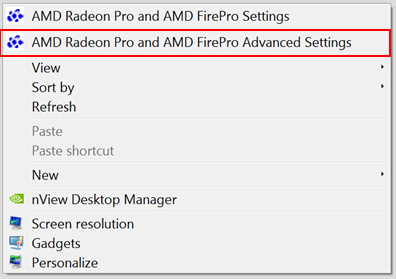
1. Right-click on the desktop and choose [AMD Radeon Pro and AMD FirePro Advanced Setting].
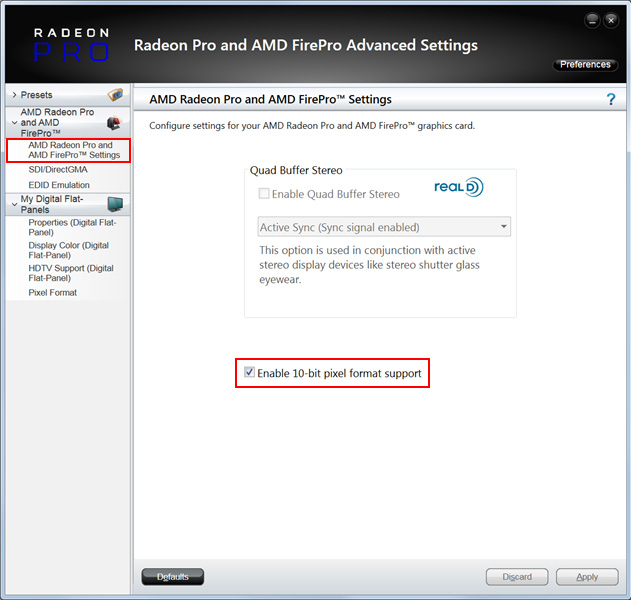
2. Choose [AMD-Radeon Pro and AMD FirePro]-[AMD Radeon Pro and AMD FirePro Settings] and check [Enable 10-bit pixel format support].
3. Photoshop Settings
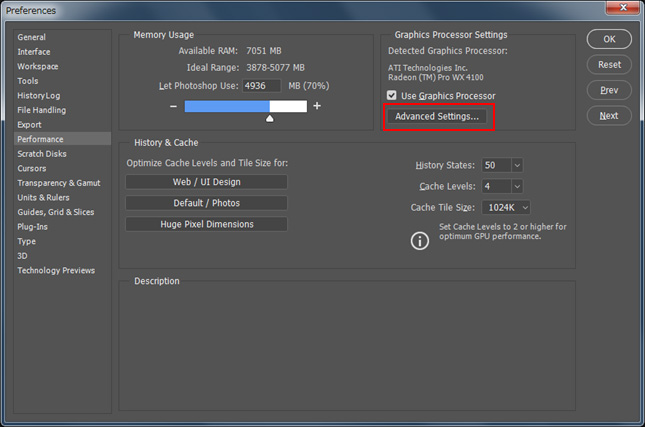
1. Choose [Edit]-[Preferences]-[Performance] and click [Advanced Settings] button in "Graphics Processor Settings".
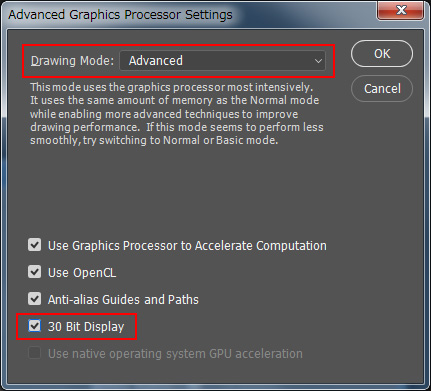
2. Then "Advanced Graphics Processor Settings menu" opens. Choose [Normal] or [Advanced] in "Drawing Mode" menu and check [30 Bit Display].
3. Compatibility information
10-bit display is available in the following combinations of monitors and graphics boards.
|
Monitors
|
CG3146, CG3145, CG319X, CG318-4K, CG2700X, CG2700S, CG279X, CG277, CG276, CG275W, CG2730, CG248-4K, CG247X, CG247, CG2420, CG246, CG245W, CG243W, CG223W, CX271, CX270, CX241, CX240, CS2740, CS2731, CS2730, CS270, CS2400S, CS2400R, CS2420, CS240, CS230 |
|
Graphics Boards
|
|
|
Photoshop |
Adobe Photoshop desktop (ver.18 or later) |
|
OS |
Windows 10/8.1 (conforms to the graphics board driver) |
| Connection | USB Type-C, DisplayPort |


