

Support
FAQs
Q.
When using ColorEdge calibrated by ColorNavigator 6 and Chrome version.68 or later, colors not displayed correctly.
A.
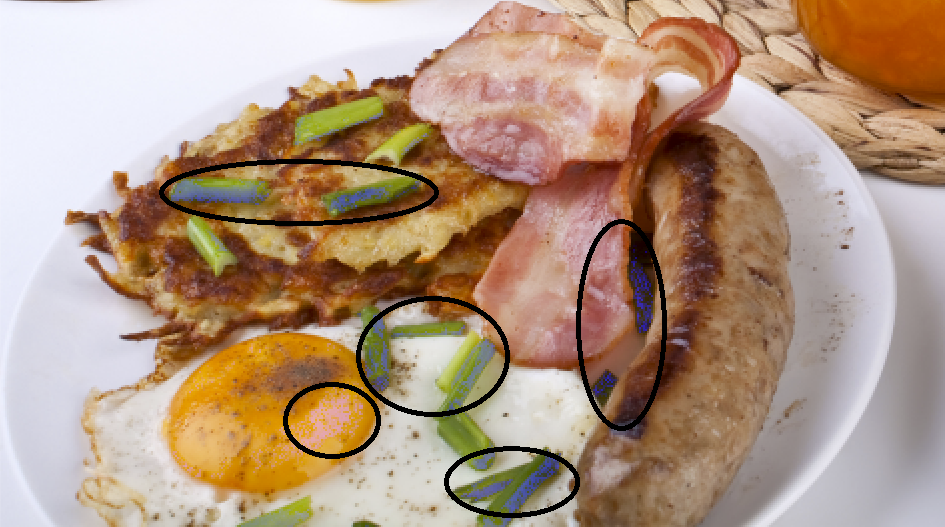
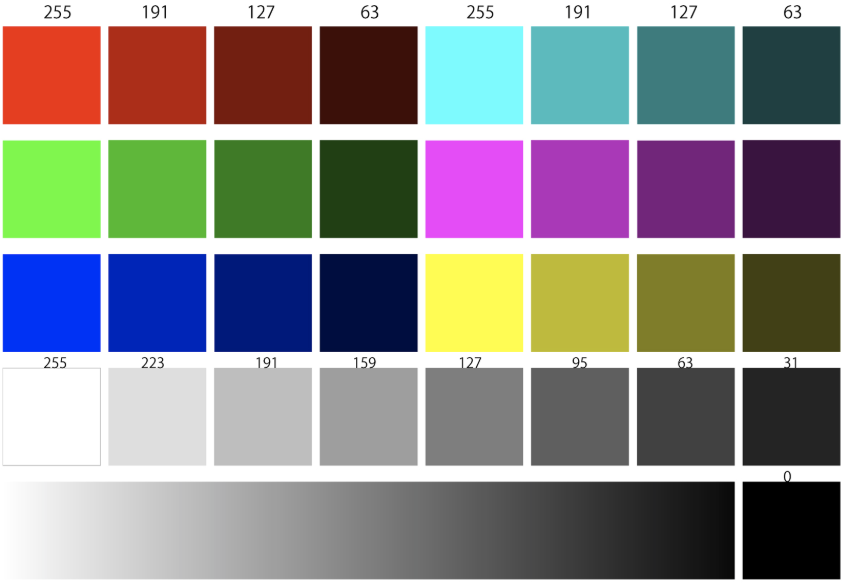
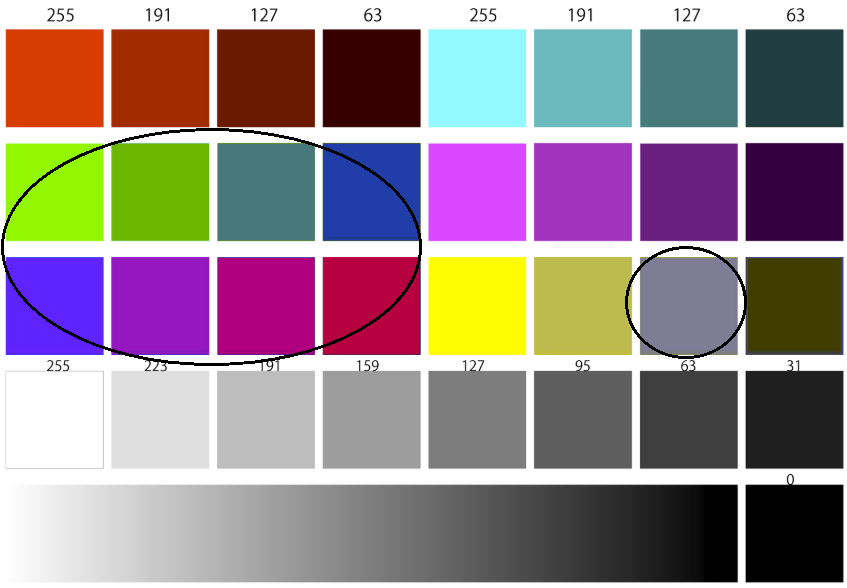
When using ColorEdge calibrated by ColorNavigator 6/7 and Chrome version.68.0.3440.84 (Win/mac) or later, colors are not displayed correctly.
When using ColorNavigator NX, this phenomenon does not occur.
| Example: | ||
| Displayed correctly | Not displayed correctly (Please look at the circle with black color) | |
 |
 |
|
 |
 |
|
This issue has been resolved on Google Chrome version.72.0.3626.109 (Win/Mac).
Please check your Google Chrome version and update to newer version if necessary.
If it is impossible to update Google Chrome version, please change the profile policy of ColorNavigator 6/7.
This phenomenon may be solved by changing the profile policy of ColorNavigator 6/7.
1. Quit Google Chrome.
2. Start up ColorNavigator 6, Click “Create a new target” in the main window.
3. Select “Use an existing target” in the target creation method selection window, Click “Next”.
4. Select a target for which you want to change the profile policy from the “Target” pull-down menu, Click “Next”.
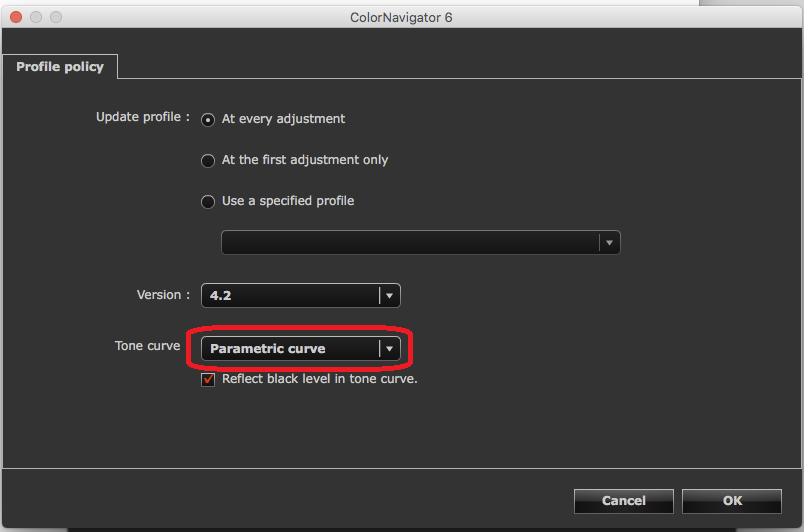
5. Click “Customize profile”, in the target name setting window.
6. Uncheck ”Reflect black level in tone curve”, click ”OK”.
7. When you click “Finish”, monitor adjustment will be started.
8. Restart the computer.
| Process6: |
| Uncheck ”Reflect black level in tone curve”. |
|
|
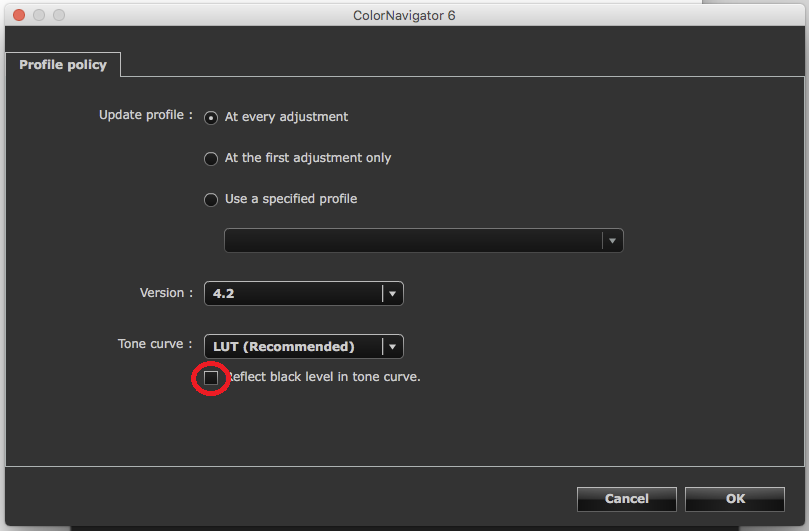
If you perform validation, check ”Reflect black level in tone curve” and select “Parametric curve” and, go to process 7.
1. Quit Google Chrome.
2. Start up ColorNavigator 7, Click “Preference”.
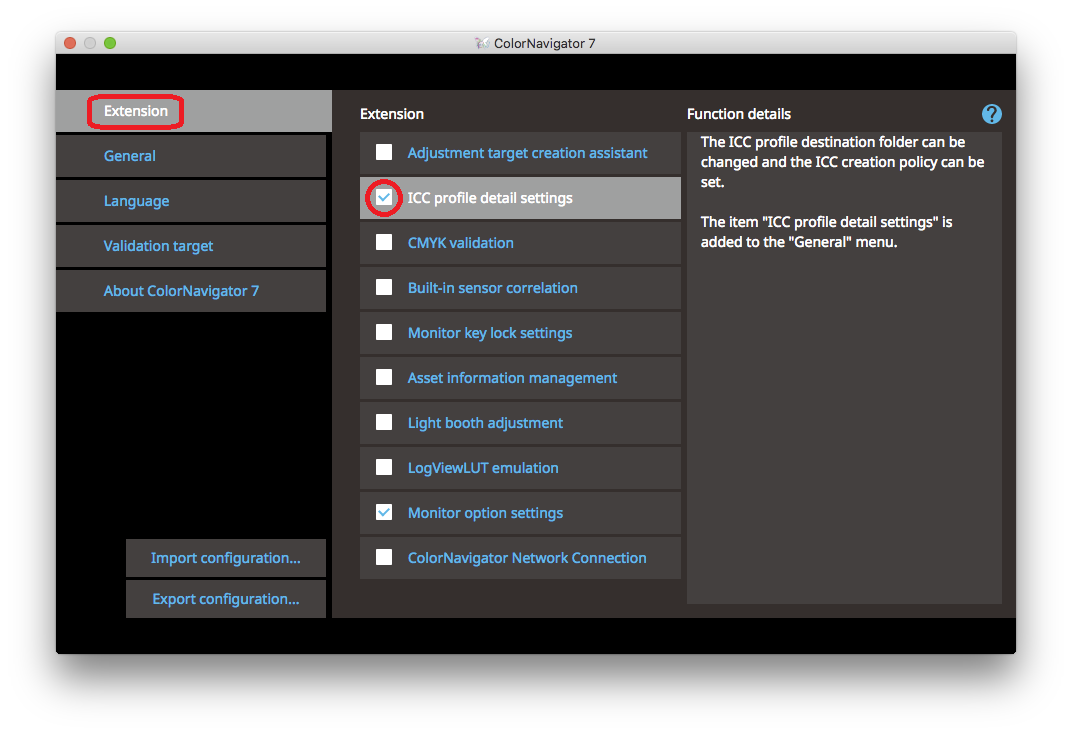
3. Select “Extension” in the left window, and Check “ICC profile detail settings” in the right window.
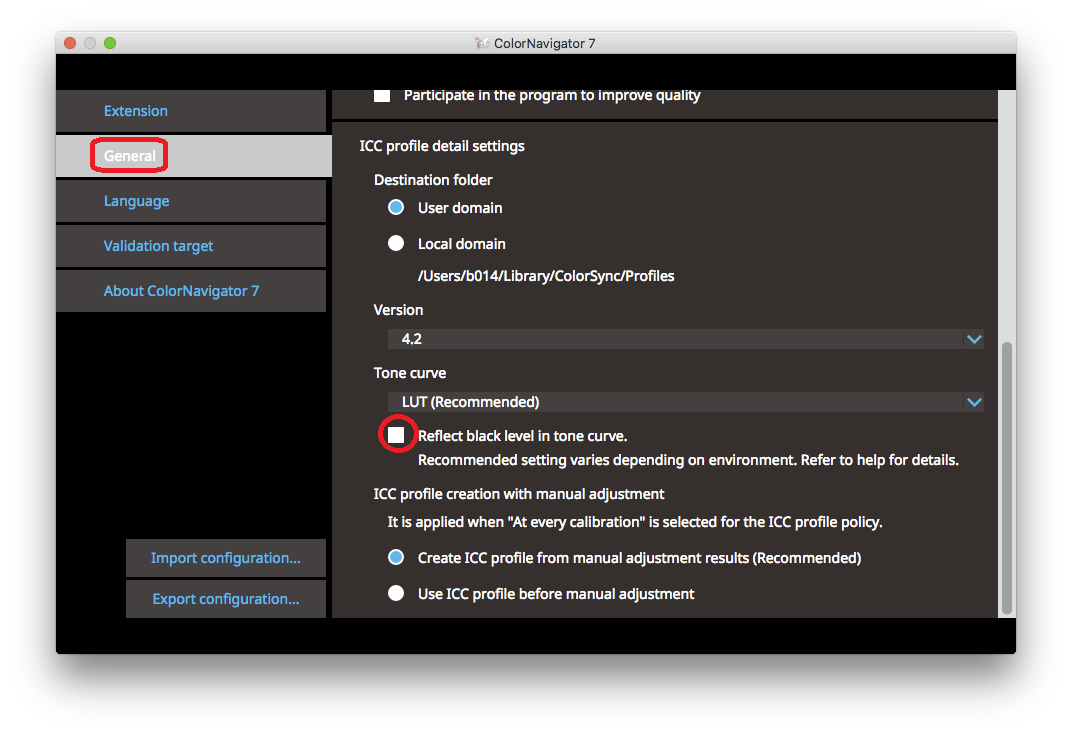
4. Select “General” in the left window, and Uncheck ”Reflect black level in tone curve”. (Default setting is unchecked.)
5. Click “X” button that is at the top-right corner of the “Preference” window.
6. Select Color Mode in use in the main window, and Click “Calibration”, monitor adjustment will be started.
7. Restart the computer.
| Process3: |
| “Preference” - “Extension” |
|
|
| Process4: |
| Uncheck ”Reflect black level in tone curve”. |
|
|
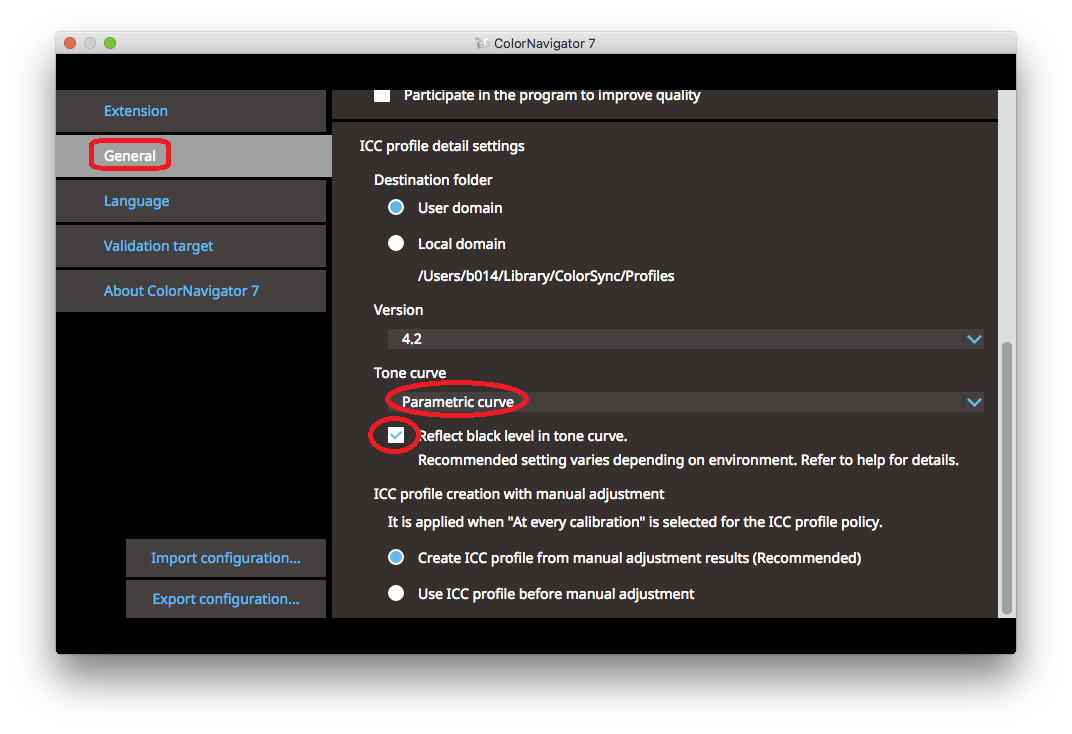
If you perform validation, check ”Reflect black level in tone curve” and select “Parametric curve” and, go to process 5.
Search results
| No. | Question | Category | Date |
|---|---|---|---|
| 1 |
ColorEdge |
September 3, 2026 | |
| 2 |
DuraVision |
July 16, 2026 | |
| 3 |
DuraVision |
July 16, 2026 | |
| 4 |
DuraVision |
June 11, 2026 | |
| 5 |
DuraVision |
March 12, 2026 | |
| 6 |
FlexScan ColorEdge |
January 15, 2026 | |
| 7 |
FlexScan ColorEdge |
January 15, 2026 | |
| 8 |
DuraVision |
November 27, 2025 | |
| 9 |
DuraVision |
November 27, 2025 | |
| 10 |
DuraVision |
November 27, 2025 | |
| 11 |
DuraVision |
November 27, 2025 | |
| 12 |
DuraVision |
November 27, 2025 | |
| 13 |
DuraVision |
November 27, 2025 | |
| 14 |
DuraVision |
November 27, 2025 | |
| 15 |
DuraVision |
November 27, 2025 | |
| 16 |
FlexScan ColorEdge FORIS DuraVision Raptor RadiForce |
June 24, 2025 | |
| 17 |
FlexScan ColorEdge FORIS DuraVision RadiForce Accessories |
April 17, 2025 | |
| 18 |
ColorEdge |
January 16, 2025 | |
| 19 |
FlexScan ColorEdge RadiForce |
September 13, 2024 | |
| 20 |
FlexScan ColorEdge RadiForce |
August 29, 2024 |
▼ Product Categories:ColorEdge FAQ ranking
| No. | Question | Category | Date |
|---|---|---|---|
| 1 |
ColorEdge |
January 7, 2022 | |
| 2 |
ColorEdge |
June 24, 2025 | |
| 3 |
ColorEdge |
January 20, 2015 | |
| 4 |
ColorEdge |
January 5, 2015 | |
| 5 |
ColorEdge |
||
| 6 |
ColorEdge |
||
| 7 |
ColorEdge |
February 7, 2023 | |
| 8 |
ColorEdge |
August 29, 2024 | |
| 9 |
ColorEdge |
July 31, 2020 | |
| 10 |
ColorEdge |
April 17, 2025 | |
| 11 |
ColorEdge |
September 13, 2024 | |
| 12 |
ColorEdge |
August 21, 2015 | |
| 13 |
ColorEdge |
||
| 14 |
ColorEdge |
January 15, 2026 | |
| 15 |
ColorEdge |
||
| 16 |
ColorEdge |
March 10, 2016 | |
| 17 |
ColorEdge |
March 22, 2019 | |
| 18 |
ColorEdge |
February 21, 2019 | |
| 19 |
ColorEdge |
May 26, 2015 | |
| 20 |
ColorEdge |
January 12, 2023 |
▼ Product Categories:ColorEdge Latest updates
| No. | Question | Category | Date |
|---|---|---|---|
| 1 |
ColorEdge |
September 3, 2026 | |
| 2 |
ColorEdge |
January 16, 2025 | |
| 3 |
ColorEdge |
September 13, 2024 | |
| 4 |
ColorEdge |
August 29, 2024 | |
| 5 |
ColorEdge |
February 17, 2023 | |
| 6 |
ColorEdge |
January 12, 2023 | |
| 7 |
ColorEdge |
January 7, 2022 | |
| 8 |
ColorEdge |
January 15, 2026 | |
| 9 |
ColorEdge |
January 15, 2026 | |
| 10 |
ColorEdge |
July 31, 2020 | |
| 11 |
ColorEdge |
June 24, 2025 | |
| 12 |
ColorEdge |
April 17, 2025 | |
| 13 |
ColorEdge |
August 2, 2019 | |
| 14 |
ColorEdge |
March 22, 2019 | |
| 15 |
ColorEdge |
February 21, 2019 | |
| 16 |
ColorEdge |
June 28, 2018 | |
| 17 |
ColorEdge |
April 6, 2016 | |
| 18 |
ColorEdge |
March 10, 2016 | |
| 19 |
ColorEdge |
August 21, 2015 | |
| 20 |
ColorEdge |
June 11, 2015 |


