

Support
FAQs
Q.
[IP Solution] When "Extended" is selected in the multi-monitor settings, how will the live screen of the IP decoding box be displayed?
A.
Applicable Models: DX0212-IP, DX0231-IP
When you select "Extended" in "Multi-Monitor" under "System" > "Other", the IP decoding box treats the two monitors as a single screen.
The maximum number of cameras that can be displayed simultaneously is 32 across the two monitors combined.
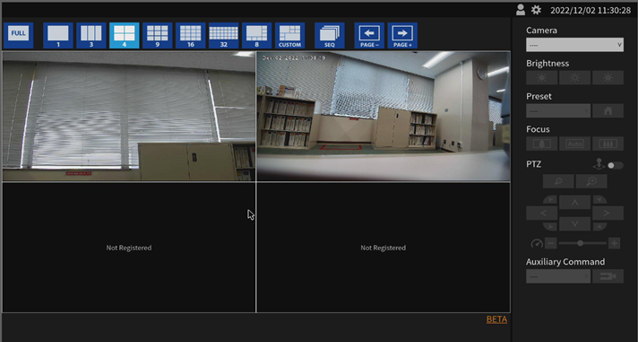
Single monitor (4-screen layout)
Multi-monitor (4-screen layout)
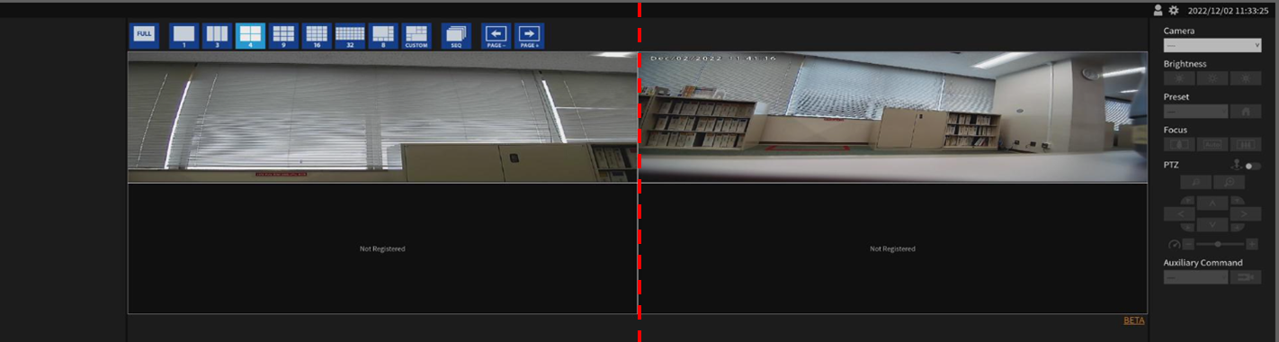
If you want to display four camera images on two monitors each, create a 2 x 4 layout on the custom screen.

When you select the single-screen layout, a camera iamge is displayed across two monitors*.
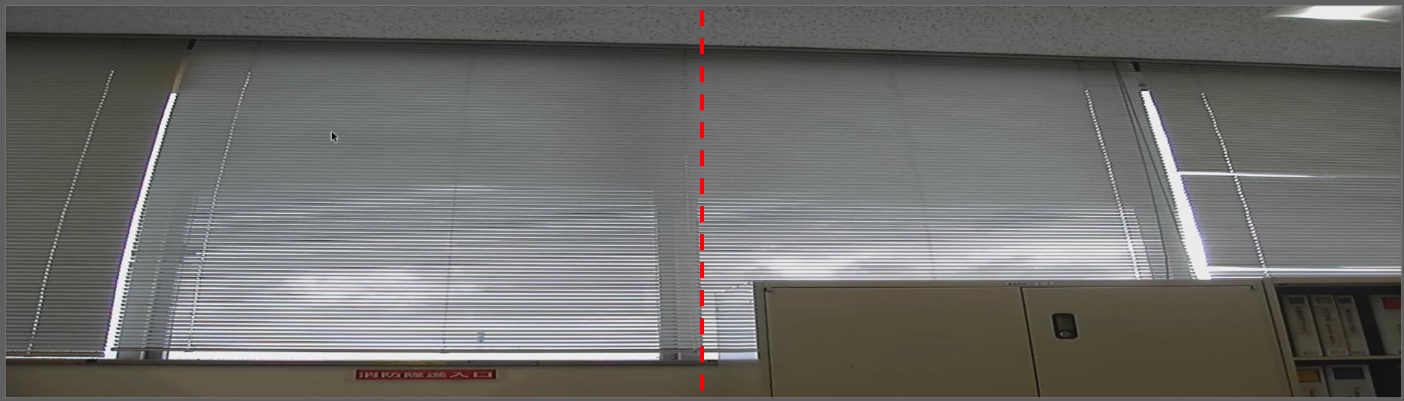
When you double-click one camera image to switch to the single-screen layout, the image will be displayed across two monitors. There is no function to display the double-clicked image on only one monitor.
*For the DX0231-IP, this feature was added in System Software Version 7.3. In addition to the "All" option, which extends a camera image across both monitors, the "Left Screen" and "Right Screen" options are also available.
Search results
| No. | Question | Category | Date |
|---|---|---|---|
| 21 |
FlexScan ColorEdge |
February 17, 2023 | |
| 22 |
FlexScan ColorEdge FORIS |
February 7, 2023 | |
| 23 |
FlexScan |
January 23, 2023 | |
| 24 |
ColorEdge |
January 12, 2023 | |
| 25 |
FlexScan ColorEdge FORIS DuraVision Raptor RadiForce |
January 7, 2022 | |
| 26 |
FlexScan |
April 16, 2021 | |
| 27 |
FlexScan ColorEdge |
July 31, 2020 | |
| 28 |
FlexScan |
June 29, 2020 | |
| 29 |
ColorEdge |
August 2, 2019 | |
| 30 |
FlexScan |
July 10, 2019 | |
| 31 |
ColorEdge |
March 22, 2019 | |
| 32 |
ColorEdge |
February 21, 2019 | |
| 33 |
ColorEdge |
June 28, 2018 | |
| 34 |
ColorEdge |
April 6, 2016 | |
| 35 |
FlexScan ColorEdge FORIS |
March 10, 2016 | |
| 36 |
FlexScan ColorEdge RadiForce |
August 21, 2015 | |
| 37 |
FlexScan ColorEdge FORIS DuraVision Raptor RadiForce Accessories |
June 11, 2015 | |
| 38 |
FlexScan ColorEdge |
May 26, 2015 | |
| 39 |
ColorEdge |
May 1, 2015 | |
| 40 |
FlexScan ColorEdge FORIS |
March 17, 2015 |
▼ Product Categories:DuraVision FAQ ranking
| No. | Question | Category | Date |
|---|---|---|---|
| 1 |
DuraVision |
January 7, 2022 | |
| 2 |
DuraVision |
June 24, 2025 | |
| 3 |
DuraVision |
January 20, 2015 | |
| 4 |
DuraVision |
April 17, 2025 | |
| 5 |
DuraVision |
||
| 6 |
DuraVision |
November 27, 2025 | |
| 7 |
DuraVision |
November 27, 2025 | |
| 8 |
DuraVision |
July 16, 2026 | |
| 9 |
DuraVision |
November 27, 2025 | |
| 10 |
DuraVision |
November 27, 2025 | |
| 11 |
DuraVision |
October 2, 2014 | |
| 12 |
DuraVision |
March 12, 2026 | |
| 13 |
DuraVision |
October 2, 2014 | |
| 14 |
DuraVision |
November 27, 2025 | |
| 15 |
DuraVision |
November 27, 2025 | |
| 16 |
DuraVision |
October 2, 2014 | |
| 17 |
DuraVision |
October 2, 2014 | |
| 18 |
DuraVision |
June 11, 2026 | |
| 19 |
DuraVision |
November 27, 2025 | |
| 20 |
DuraVision |
November 27, 2025 |
▼ Product Categories:DuraVision Latest updates
| No. | Question | Category | Date |
|---|---|---|---|
| 1 |
DuraVision |
July 16, 2026 | |
| 2 |
DuraVision |
March 12, 2026 | |
| 3 |
DuraVision |
November 27, 2025 | |
| 4 |
DuraVision |
July 16, 2026 | |
| 5 |
DuraVision |
June 11, 2026 | |
| 6 |
DuraVision |
November 27, 2025 | |
| 7 |
DuraVision |
November 27, 2025 | |
| 8 |
DuraVision |
November 27, 2025 | |
| 9 |
DuraVision |
November 27, 2025 | |
| 10 |
DuraVision |
November 27, 2025 | |
| 11 |
DuraVision |
November 27, 2025 | |
| 12 |
DuraVision |
November 27, 2025 | |
| 13 |
DuraVision |
January 7, 2022 | |
| 14 |
DuraVision |
June 24, 2025 | |
| 15 |
DuraVision |
April 17, 2025 | |
| 16 |
DuraVision |
June 11, 2015 | |
| 17 |
DuraVision |
January 20, 2015 | |
| 18 |
DuraVision |
October 2, 2014 | |
| 19 |
DuraVision |
October 2, 2014 | |
| 20 |
DuraVision |
October 2, 2014 |


